Your coding agent is gone.
Its processes aren’t.
ps tells you what is running.wyd tells you why.
Agents, MCP servers, headless browsers, dev servers, workers, databases and Docker leftovers — grouped by the session and project that started them.
curl -fsSL https://wyd.sh/install.sh | sh
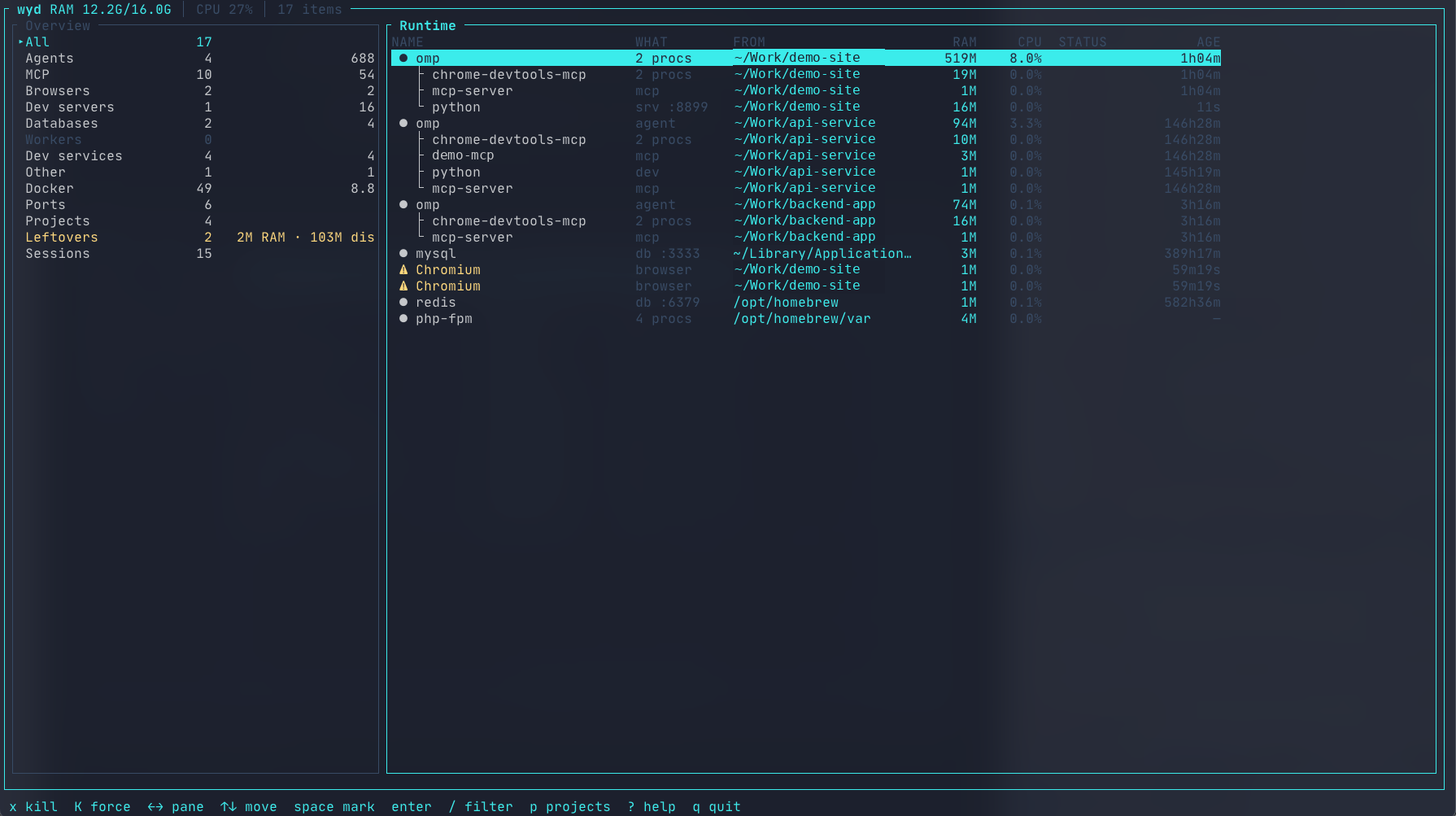
01 The problem fig. 01
Agents are good at starting things.
Every task spins up servers, browsers and workers. When the agent exits, some of them stay behind — and the OS won’t tell you which, or whose.
$ ps auxnodenodenodechromiumchromiumchromiumpythonredis-servernodenode$ wydopencode├─ chrome-devtools-mcp│ └─ Chromium ×8 1.2 GB└─ vite :5173project: ~/Work/myappThe OS sees processes.
wyd sees a development session.
02 Ownership
Runtime ownership, not PID soup.
wyd observes coding-agent sessions and records the runtime resources they create — keyed by boot, PID and start time, so the record survives re-parenting and restarts.
When ancestry disappears, provenance doesn’t have to.
A deterministic resolver attributes resources to a recorded session — with an explainable score.
03 Leftovers fig. 02
The session ended. This didn’t.
wyd --json leftovers
04 Explain
Ask why a process exists.
wyd keeps local runtime provenance, so it can explain which recorded session owned a process — and show the evidence behind the attribution.
$wyd why 94148chrome-devtools-mcp pid 94148origin session: opencode 8f3a2c1d9e4b07a6project: ~/Work/acme-dashboardsession: endedattribution: Owned (resolver v1)05 Managed runs
Let the agent run tests — on your terms.
wyd run starts a command under a local supervisor: a deadline, a process group wyd owns, bounded logs, and a shared admission budget so several agents on one machine do not all start at once.
wyd run --timeout 120s -- npm test
01
Hard deadline, full cleanup
A hung test cannot hang you.
The run gets its own process group; on timeout, cancel or Ctrl-C wyd stops it gracefully, then for real — and reports what remains honestly.
02
One admission budget
Many agents, one queue.
Slots, per-project caps and a bounded queue with starvation bypass; memory reservations form a shared budget. On Linux, hard limits come from a delegated cgroup v2 subtree.
03
Read the aftermath
Durable, daemon-free reads.
wyd runs, wyd logs <id> --follow, wyd cancel <id> — and the same answers over stdio MCP with wyd mcp --allow-run.
06 WebMCP fig. 03
Your browser agent investigates with you.
wyd web is a loopback dashboard with a WebMCP tool surface. A browser agent can ask about leftovers, and the visible UI reflects its reasoning — while you keep control of every destructive action.
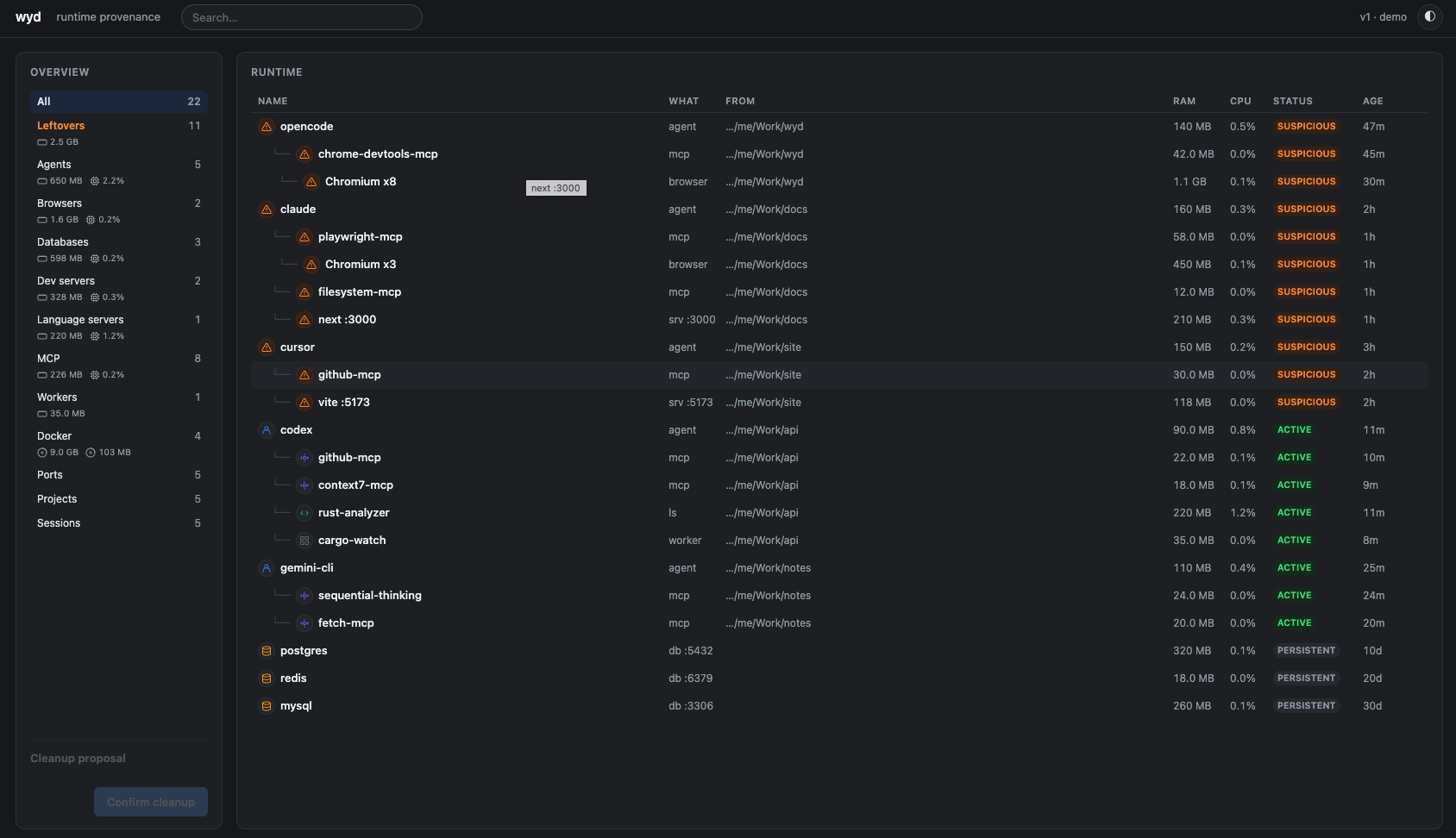
01
Agent reasons, UI reflects it
The dashboard is the tool surface.
focus_resource and propose_cleanup visibly update the page you’re looking at — not a hidden backend.
02
Human stays in control
No destructive WebMCP tool.
Terminate re-validates PID + start time and asks inline; cleanup is confirmed by hand.
03
Structured tools, not UI guessing
Machine-readable by design.
The agent gets typed tools for sessions, leftovers, provenance and cleanup proposals instead of scraping text or guessing from screenshots.
07 Coverage
What wyd understands.
A signature registry over name, argv and executable — precise matches, not substring guesses. OS daemons stay hidden. Desktop Chrome stays hidden. Agent-spawned Chromium does not.
- Agents
- claude · codex · opencode · omp · gemini · aider · amp · crush · goose · qwen code · droid · kiro · antigravity · pi · cursor
- MCP servers
- chrome-devtools-mcp · playwright-mcp · filesystem · context7 · queryknight · any
*-mcp - Browsers
- headless Chromium · chrome helpers · chromedriver · Firefox
- Dev servers
- vite · next · nuxt · astro · svelte-kit · remix · nest · rails · phoenix · django · flask · uvicorn · gunicorn · webpack · parcel · rsbuild · rspack · puma · php
- Workers
- celery · sidekiq · horizon · laravel queue · nodemon · cargo-watch · watchexec · air · tsc --watch · tailwindcss --watch
- Databases
- postgres · mysql · mariadb · redis · mongodb · elasticsearch · opensearch · clickhouse · cockroachdb · cassandra · memcached · neo4j · qdrant · weaviate · milvus · meilisearch · typesense · influxdb · sql server
- Language servers
- rust-analyzer · gopls · typescript · copilot · pyright · clangd · lua · intelephense · vue · svelte · tailwind · eslint · yaml · bash · docker · jdtls · ruby · nix · biome
- Docker
- containers · dangling images · volumes · build cache
Yours isn’t listed? Add a [[signature]] rule in ~/.config/wyd/config.toml.
08 Safe by design
Useful enough to kill things.
Careful enough not to guess.
01
Process identity
PID alone is not enough.
wyd re-checks PID and process start time before signaling, and asks y first. PID reuse can’t turn a kill into a lottery.
02
Docker data
Unused doesn’t mean garbage.
Named volumes are never treated as disposable. Pruning covers only anonymous, unattached volumes — previewed with wyd prune --dry-run, confirmed with y.
03
Local
Your runtime stays on your machine.
No account. No telemetry. No cloud. Provenance lives in a local SQLite database — readable by the TUI, the CLI, or wyd serve.
09 Provenance
See the session, not just the process.
Each observed agent invocation is a session — agent, project, state, age, id — recorded locally, kept across restarts. wyd mcp serves the same answers to coding agents over stdio; wyd serve keeps them fresh as a local daemon.
wyd --json sessions
$ wyd mcpagent which session owns pid 94148?wyd opencode · ~/Work/acme-dashboard session ended 47m ago10 Install
Find out what you’re still running.
curl -fsSL https://wyd.sh/install.sh | sh
brew install oxyplay/tap/wyd
cargo install wyd
wyd